Papa’s Sushiria






Play Papa’s Sushiria Online for free! Step into Sakura Bay and take over Papa Louie’s busy sushi and bubble tea shop. You’ll cook fluffy rice, roll fresh ingredients, and slice perfect sushi pieces for a long line of hungry customers. Every order tests your speed, memory, and creativity, but great service means big tips and happy regulars. Whether you’ve tried Papa’s Sushiria on other sites or you’re brand new to the series, this browser version lets you jump in instantly with no downloads. Learn real restaurant time-management skills while having fun mixing flavors, unlocking holidays, and decorating your dream sushi bar. 🍣
- Run your own colorful sushi and bubble tea restaurant in Sakura Bay.
- Cook rice, roll sushi, and serve drinks across four busy stations.
- Unlock new ingredients, decorations, customers, and outfits as you rank up.
- Play quick daily shifts, mini-games, and challenges that never really end. 🎮
What is Papa’s Sushiria?
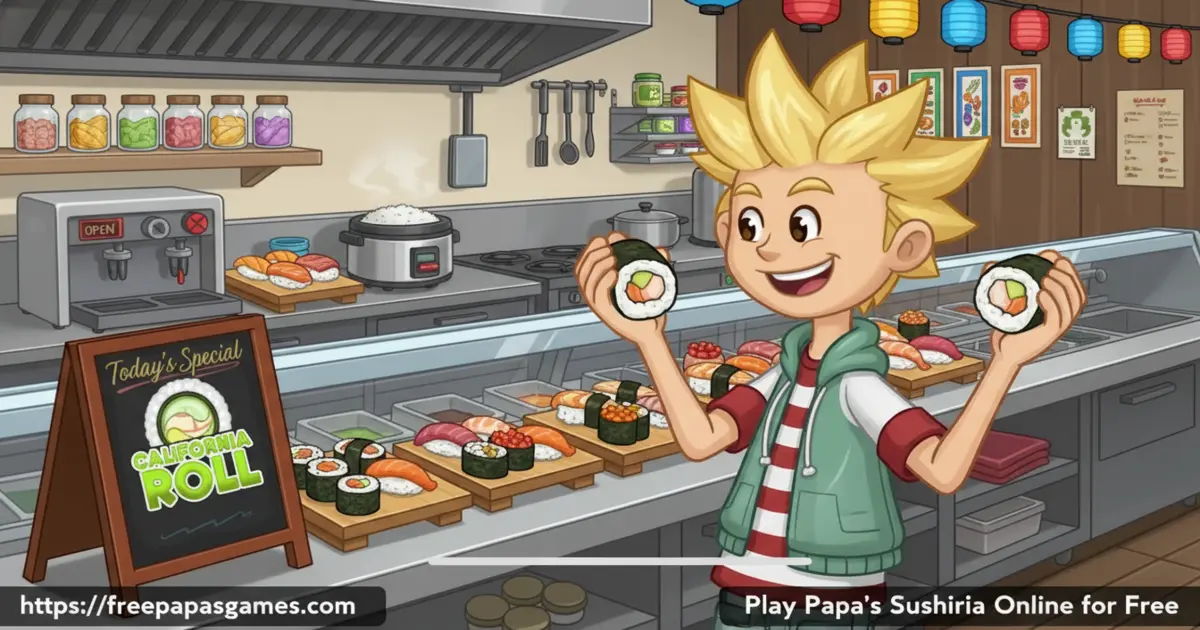
Papa’s Sushiria is a cooking and restaurant management game by Flipline Studios, creators of the classic Papa’s series. After you accidentally break Papa Louie’s lucky cat, you’re put in charge of his brand‑new sushi shop in Sakura Bay. During each workday, you take orders, cook rice, build custom sushi rolls, and prepare tasty bubble tea for a growing cast of regulars. The original browser version launched around 2016–2017, and the mobile edition, called Papa’s Sushiria To Go, brings the same fast, hands‑on fun to phones and tablets.
Papa’s Sushiria Gameplay
Gameplay in Papa’s Sushiria is all about juggling four stations without panicking. At the Order Station, you write down each customer’s ticket. At the Cook Station, you simmer white or brown rice and season it with vinegar at just the right moment. At the Build Station, you spread rice, add fillings, flip rolls when the rice goes on the outside, top everything with sauces and sprinkles, then slice it into perfect pieces. Finally, at the Tea Station, you pour milk, add flavors, and top with boba for a matching bubble tea. Many kids search for “Papa’s Sushiria unblocked” because this style of time‑management challenge is super satisfying to master.
Graphics and Sound
The game has bright, cartoony graphics with bold colors and friendly characters that feel straight out of an anime café. The sushi ingredients look surprisingly detailed, so you can easily tell salmon from shrimp or mango from avocado at a glance. Each station has smooth animations, from puffing rice cookers to sparkling tea cups. Fun sound effects and cheerful music keep things lively without being too loud, making Papa’s Sushiria comfortable to play for long sessions. 🎧
Levels and Progression
Your time in Papa’s Sushiria is split into workdays rather than numbered levels. Each day brings new customers, tougher orders, and sometimes a very picky “closer” at the end of your shift. As you serve great sushi, you earn points and rank up, eventually reaching Rank 65, where Papa Louie himself visits. Along the way, you unlock new rice types, wraps, fillings, toppings, sauces, tea flavors, and boba pearls. You’ll also open up mini-games, new furniture, and outfits, so the game keeps feeling fresh even after many hours.
Customization and Upgrades
Papa’s Sushiria lets you customize almost everything. You can play as Matt, Clover, or design your own worker with different hairstyles, colors, and clothes. Tips you earn can buy upgrades like cook boosters, rice alarms, milk auto‑pour, and cutting guides that make your sushi sharper and faster. You can decorate the shop lobby with themed furniture and posters that help customers stay patient. Smart upgrade choices are a big part of strategy, especially when rush hours get wild.
Seasons, Holidays, and Events
The restaurant in Papa’s Sushiria follows an in‑game calendar packed with holidays, from New Year’s and Valentine’s Day to Halloween and Christmas. Each holiday brings special ingredients, new decorations, and cute outfits for your customers. One month, you might drizzle cherry‑blossom sauce, and another, you could be rolling festive Thanksgiving flavors. Learning which customers love which holiday makes the game feel like a year‑round event, not just a simple cooking sim.
Achievements, Stickers, and Specials
As you play Papa’s Sushiria, you collect colorful stickers for completing little challenges, like serving a certain customer perfectly or mastering a tricky recipe. Earning sticker sets unlocks new outfits for your regulars. Some extra‑picky customers hand you golden envelopes containing Special Recipes. When you feature a Special as the Daily Special, other customers can order it for bonus tips or extra points. Chasing these rewards feels a bit like hunting achievements in a game hub, but inside one cozy sushi shop.
Why Players Love Papa’s Sushiria
Fans love Papa’s Sushiria because every order feels like a tiny puzzle. You need good timing, sharp memory, and a steady mouse hand, but the game is still friendly and funny. The mix of sushi-making, boba-tea crafting, and shop decorating keeps it from feeling repetitive. If you’ve enjoyed other Papa’s games or even action on sites like Papa’s Sushiria Poki versions, this one might become your new favorite thanks to its depth and challenge.
Is Papa’s Sushiria Educational?
Even though it’s mainly for fun, Papa’s Sushiria quietly teaches useful skills. You practice reading, following multi‑step directions, and managing time under pressure. You’ll plan upgrade budgets, remember patterns, and notice how small changes affect customer scores—just like a tiny Papa’s Sushiria culinary school inside your browser. Teachers and parents often like these games because they build focus, logic, and responsibility while still feeling like pure play.
Platform
You can play Papa’s Sushiria directly in your web browser on a desktop or laptop, with no extra downloads. For phones and tablets, you can enjoy Papa’s Sushiria mobile by using the official Papa’s Sushiria To Go apps, which are designed especially for touchscreens.
How to Play Papa’s Sushiria?
To play Papa’s Sushiria, start by choosing your worker or creating a custom character. Each day, customers line up and show a speech bubble when they’re ready. Click the bubble to take their order ticket. Move to the Cook Station to start the rice, then switch to the Build Station to place a wrapper on the mat. When the rice is cooked and seasoned, spread it on the wrapper, add the requested fillings, flip it if needed so the rice is on the outside, and roll it tightly. Add any sauces and toppings, then slice on the guides. Finally, move to the Tea Station to pour milk, flavor, and boba, then serve the complete meal. The faster and more accurately you work, the more tips and points you earn, whether you’re on PC or using the Papa’s Sushiria mobile apps.
Instructions and Controls
- Use your mouse to click, drag, and drop ingredients at every station.
- Click the colored station buttons at the bottom to switch between Order, Cook, Build, and Tea stations.
- Click a customer’s order bubble to take their ticket and place it on the ticket line.
- Click and hold while pouring sauces, toppings, or tea, then release when the meter reaches the target zone.
- On touch devices in Papa’s Sushiria To Go, tap and swipe instead of clicking and dragging, but the steps are the same.
Tips and Tricks for Papa’s Sushiria
- Start cooking rice as soon as you grab a ticket so it’s ready when you need it.
- Watch the rice bar carefully or buy rice alarms and cook boosters to avoid burning it.
- Place fillings in a neat line so every sushi slice looks even and scores higher.
- Give “closer” customers extra attention; their high standards can boost or drop your daily rank. ⭐
- Spend early tips on smart upgrades like milk auto‑pour and cutting guides before buying decorations.
- Play the daily mini-games to win free furniture and clothing instead of spending all your cash. 🎁
Features of Papa’s Sushiria
- Run a full sushi and bubble tea bar with four detailed stations to master.
- Unlock dozens of ingredients, from different rice types and wraps to sauces, toppings, and boba flavors.
- Meet over 100 unique customers, each with favorite orders, holidays, and outfits.
- Enjoy 12 in‑game holidays with special recipes, decorations, and seasonal ingredients.
- Collect stickers, earn Special Recipes, and play daily mini-games for extra rewards.
- Play Papa’s Sushiria free in your browser with save‑anytime progress.
Papa’s Sushiria Online
When you play Papa’s Sushiria online, the game runs right in your browser using modern technology that emulates the original Flash version. There’s no need to install plugins, and your progress can be saved between days, so you can keep building your dream sushi shop. It’s quick to load, kid‑friendly, and perfect for short play sessions during breaks.
Papa’s Sushiria for Free
Papa’s Sushiria is a free game to play in your browser, so you can jump into the kitchen without paying or creating an account. You can practice your skills, test new ingredient combos, and replay days as much as you like. If you later decide you want to play on the go, you can grab the paid To Go version on mobile while still enjoying the free browser edition here.
Download Papa’s Sushiria
On Android
Download on Google Play to get Papa’s Sushiria To Go on your Android phone or tablet. The mobile version is tuned for touch controls, works offline, and lets you manage your sushi shop anywhere.
On iPhone or iPad
Download on the App Store to enjoy Papa’s Sushiria To Go on iOS devices. It keeps the same four‑station gameplay but fits perfectly on smaller screens.
APK Papa’s Sushiria
You might see websites offering a “Papa’s Sushiria APK” download, but it’s safest to install the game only from official stores like Google Play. That way, you know your version is up to date, secure, and supports the developers who made the game.
On PC
On PC or laptop, you can play Papa’s Sushiria online in your browser with no installer or launcher. Just open the game page on Free Papas Games, press play, and your save file will stay on your device so you can return to your restaurant anytime.
Can You Play Papa’s Sushiria Unblocked?
Yes. Many students search for ways to play Papa’s Sushiria unblocked at school or on shared computers. Here, the game runs in the browser without extra pop‑ups, so it often works even when big game portals are blocked. Because progress saves locally, you can quietly build your sushi empire between homework sessions, then continue later at home.
Papa’s Sushiria Unblocked 76
Some players are used to “76” style unblocked sites. Instead of hunting through random mirrors, it’s easier to use a clean, focused version of Papa’s Sushiria that loads quickly and keeps your saves safe. If your browser is updated, the game should run smoothly on most school Chromebooks, Windows PCs, and Macs.
Papa’s Sushiria Extension
Want even faster access? When an official Papa’s Sushiria extension is released, you’ll be able to install it from your browser’s extension store and open the game with one click. Always choose official extensions only and avoid copies that might include ads or extra software.
Similar Games to Papa’s Sushiria
If you’re a fan of Cooking Games, you’ll definitely enjoy these too:
FAQs About Papa’s Sushiria
What kind of game is Papa’s Sushiria?
Papa’s Sushiria is a cooking, business, and time‑management game. You run a sushi and bubble tea restaurant, take custom orders, and try to serve them quickly and accurately to earn tips, points, and upgrades.
How do you play Papa’s Sushiria step by step?
First, take the customer’s order ticket at the counter. Second, start their rice at the Cook Station and season it with vinegar when the bar reaches the marked zone. Third, move to the Build Station, spread rice on the wrapper, add fillings in order, flip if needed, roll, add toppings, and slice. Fourth, head to the Tea Station to mix their bubble tea. Finally, match the plate and drink with the correct ticket and deliver the order for a score.
Can I play Papa’s Sushiria online for free?
Yes, you can play Papa’s Sushiria online for free in your browser with no subscription. Just load the game page, hit play, and your progress will save on your device so you can continue another day.
Is Papa’s Sushiria available on mobile?
Yes. The browser version works best on computers, while the official Papa’s Sushiria To Go app is built for phones and tablets. It offers the same core gameplay with controls redesigned for touch, so Papa’s Sushiria mobile feels smooth on smaller screens.
Does Papa’s Sushiria ever end?
Papa’s Sushiria has a long progression with many ranks. The main storyline is considered complete when you reach Rank 65 and serve Papa Louie himself, but you can keep playing after that to collect stickers, master specials, and decorate your shop however you like.
What are the best upgrades to buy first?
Most players recommend buying cook boosters and rice alarms early so rice never burns. The milk auto‑pour upgrade saves time at the Tea Station, and the cutting guide helps you slice perfectly even pieces. After those, you can focus on decorations and doorbells to keep customers patient.
Is Papa’s Sushiria hard to play?
Papa’s Sushiria is one of the more challenging Papa’s games because each order has many steps. However, the tutorial is clear, and the first days are slow, so you can practice. With a bit of patience, kids quickly learn the patterns and start earning high scores.
Is Papa’s Sushiria safe and kid‑friendly?
Yes. Papa’s Sushiria has a family‑friendly theme with no violence or chat. Reading, timing, and careful clicking are all you need. It’s great for players around 8 and up who like organizing, cooking, or strategy games.
Are there mini-games in Papa’s Sushiria?
After each workday, you can spend tickets on mini-games such as Home Run Derby, Rico’s Chiliworks, Freeze‑Putt, and more. Winning mini-games gives you furniture, clothes, or small cash prizes that help improve your restaurant without using all your tips.
What’s the difference between Papa’s Sushiria and Papa’s Sushiria To Go?
The main difference is the platform and controls. Papa’s Sushiria is the classic browser version, while Papa’s Sushiria To Go is a paid mobile app with touch‑friendly controls, redesigned layouts for small screens, and some extra quality‑of‑life features. The core stations and recipes are very similar.
Can I transfer my Papa’s Sushiria progress to another device?
Browser saves usually stay on the computer where you play, so switching devices normally means starting a new file. On mobile, Papa’s Sushiria To Go keeps your savings on that phone or tablet. To play in different places, many kids keep one save on their home computer and another on their mobile device.
Where can I learn more about Papa’s Sushiria characters and story?
If you love the lore, you can look up fan‑made resources such as a Papa’s Sushiria wiki, where players list customers, favorite orders, holidays, and story details. It’s a fun way to discover which characters you still haven’t met.
Can I play Papa’s Sushiria at school if game sites are blocked?
That depends on your school filters. Students who can’t reach big portals sometimes search for Papa’s Sushiria hooda math or other mirrors. A clean, focused version hosted on an education-friendly site often has a better chance of working, but you should always follow your school’s rules.
How many customers and ingredients are in Papa’s Sushiria?
The browser version includes over 100 customers, each with a favorite order and holiday. You’ll unlock multiple rice types, several wraps, more than 20 fillings, and lots of sauces and toppings, plus many tea and boba flavors. Altogether, there are well over 100 ingredients to discover, especially if you also play Papa’s Sushiria To Go.
Conclusion
Papa’s Sushiria turns running a sushi and bubble tea bar into a colorful, fast‑paced challenge that’s perfect for kids and fans of cooking games. With deep progression, clever upgrades, and endless custom orders, there’s always a new combo to try or a new customer to impress. Fire up the rice cooker, grab your rolling mat, and play Papa’s Sushiria online for free to see if you can become Sakura Bay’s best sushi chef.
Gameplay Video